Crochet chart maker · in beta
A crochet chart maker that checks your counts
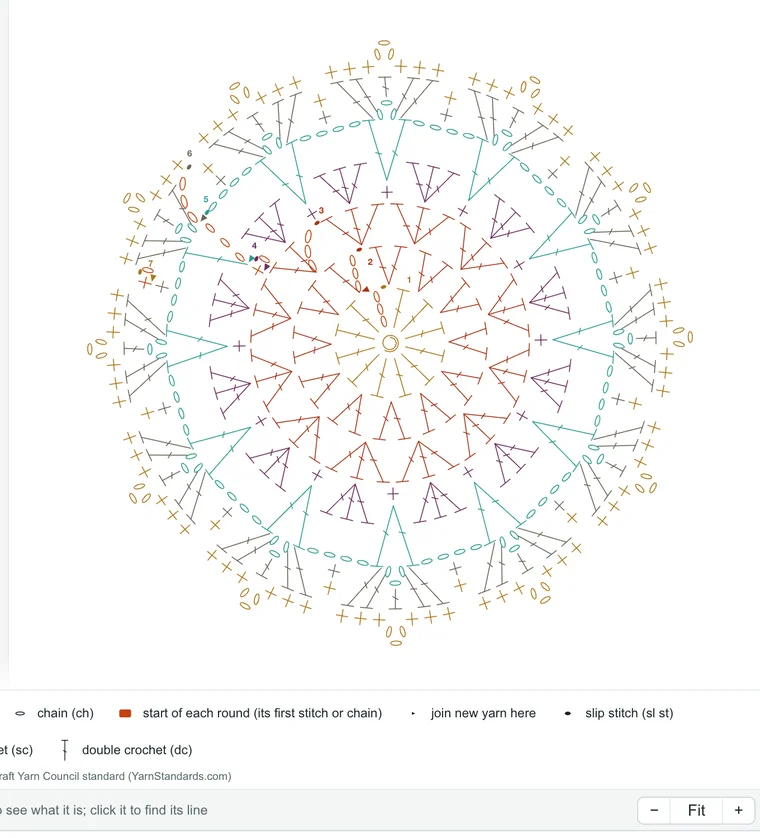
Build your pattern round by round in the Krowshea Studio and the symbol chart draws itself, with a key, the written pattern beside it and every stitch count checked. Change a round and the chart, the words and the counts change with it.
How it works
You build the pattern; the chart follows
- Pick a startA magic ring, a chain ring or a foundation chain, or open a Library pattern and change it.
- Add rounds or rowsChoose a stitch or a stitch group, like a shell or a V-stitch, and where it goes. No code needed.
- Watch the chartEvery stitch appears in its standard symbol as you add it, with a key of the symbols you used.
- Read it every wayThe same pattern as a symbol chart, in your colors, in 3D Yarn and written out in US or UK terms.

Charts it draws
Rounds, rows and lace

- Round charts for circles, mandalas, doilies and granny squares, read from the center out, with each round's start marked.
- Row charts for blankets, dishcloths and swatches, with each row's direction.
- Lace and chain spaces: arches, picots, clusters, puffs, popcorns and post stitches in their usual symbols.
- A key of every symbol on the chart, in the Craft Yarn Council style.
- Left-handed: switch Hand to Left and the chart mirrors the way your work comes out.
Symbols or a grid?
Symbol charts and color grids are different tools
A symbol chart
Shows each stitch, where it goes and how tall it is. It is the chart for lace, motifs, doilies and stitch patterns. This is what Krowshea draws.
A color grid
Shows one color per square, for tapestry, C2C and graphghans. Krowshea's Color view shows each stitch in its yarn instead.
The check
It checks every count
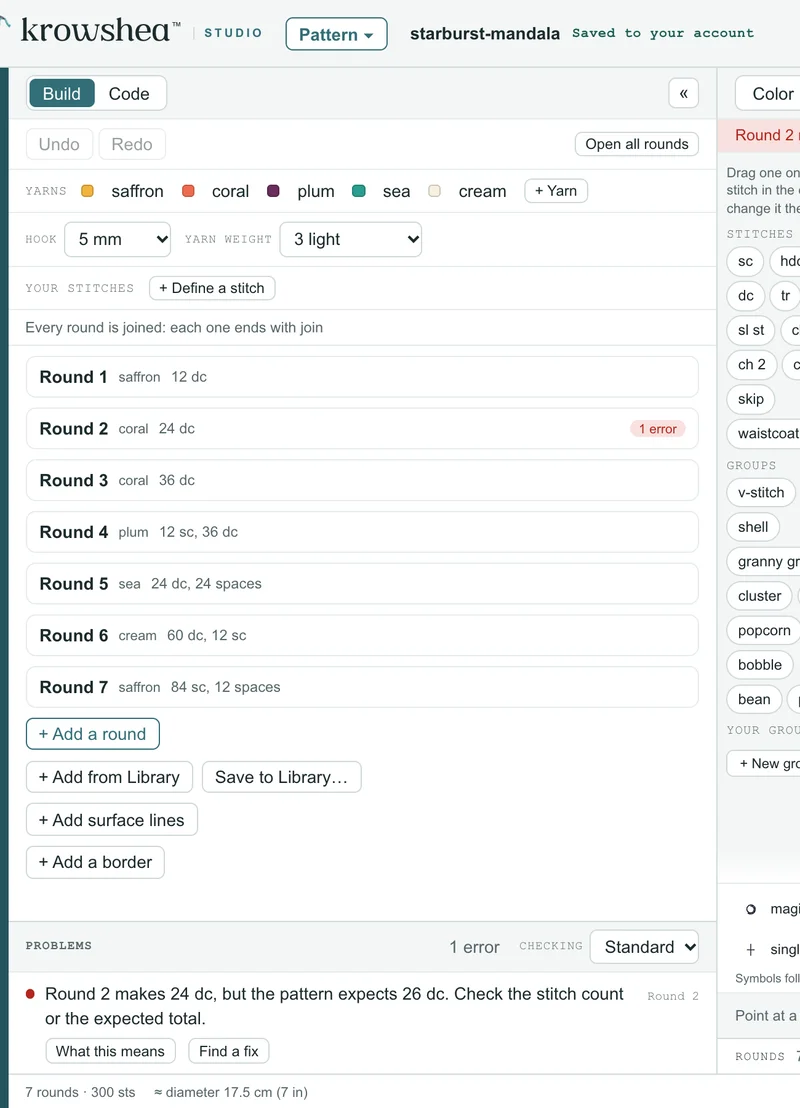
Most chart makers draw what you give them. Krowshea also counts what each round uses and makes. A wrong count lights up on the chart and in the round, with the reason in plain words, so the chart you share matches the pattern.
ErrorRound 2 makes 24 dc, but the pattern expects 26 dc. Check the stitch count or the expected total.
Questions
Questions
Is it free?
The Studio is in beta and makers are coming in a few at a time. Join the list to hear when your invite is ready. The patterns, charts and stitch lessons on this site are free.
Do I need to know code?
No. You build with stitches and stitch groups. Underneath, every pattern is saved in Krowshea, a small crochet language, and you can write in it if you like code.
Can I print the chart?
Yes. Print gives a clean page with the chart, its key and every round written out.
Can it turn a written pattern into a chart?
Partly. Paste a written pattern in US or UK terms and Krowshea charts the lines it can read and checks their counts. Lines it can’t read yet stay in as notes for you to finish.
Does it use AI?
No. Charts, counts and 3D Yarn are worked out by Krowshea's own rules from the stitches you choose.
Krowshea is in beta
Make your first chart
The Studio is in beta. When your invite comes, you will be able to:
- Build rounds and rows with stitch groups and watch the chart draw itself
- Read the pattern as a chart, in color, in 3D Yarn and in US or UK terms
- Have every stitch count checked as you go
- Print a clean pattern with the chart and its key